
🎼 Music on Hold — Customize the Caller’s Experience
Part of the UsVox System Administration Web Interface Manual
Created by the UsVox Support Team
📌 Purpose
The Music on Hold feature allows you to control what callers hear while they are waiting on hold in your IP Centrex environment. You can enable or disable hold music and upload your own custom audio files.
✅ How to Manage Music on Hold
1️⃣ Enable or Disable Music on Hold
-
Click the 🎼 Treble Clef icon to turn the Music on Hold feature ON or OFF.
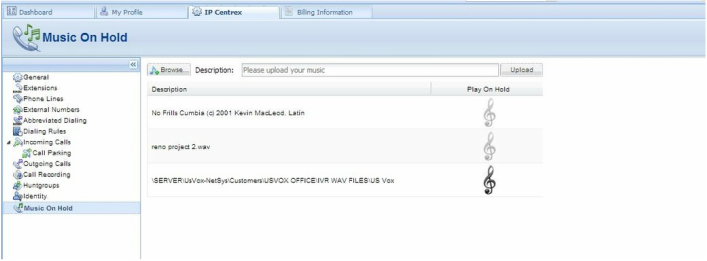
2️⃣ Upload a Custom Music File
-
Click the Browse button and select a music file from your local computer.
Optional: Enter a custom name in the Music Name field.
- If left blank, the system will use the original file name.
- Click Upload — your new file will replace the previous hold music.
3️⃣ Activation Time
- After the upload, the new Music on Hold will typically become active within 10 to 15 minutes after applying the settings.
✅ Best Practices
🎵 Use high-quality audio files in a common format (e.g. MP3 or WAV).
🎵 Keep file sizes reasonable to ensure smooth playback.
🎵 Test your hold music by putting a test call on hold to verify the audio quality.
📞 Need Help?
For assistance with uploading or managing Music on Hold, contact the UsVox Support Team:
📧 support@usvox.com
📞 1.855.MyUsVox (698-7869)
📱 Call Support at 1786-275-5888
HABLAMOS ESPAÑOL